 d770504fa5
This commit includes the complete Kubernetes infrastructure deployment for NGE6:

- Crossplane setup with providers (Kubernetes, Helm, Civo)
- Ambassador/Emissary ingress controller with SSL termination
- Cert-manager with Let's Encrypt and Gandi webhook for DNS01 challenges
- ExternalDNS integration with Gandi for automatic DNS management
- Keycloak authentication server with PostgreSQL
- Pomerium identity-aware proxy with OIDC integration
- Forgejo Git server with persistent storage and authentication
- Spire/SPIFFE for secure service communication

All services are deployed using Infrastructure as Code principles with
Crossplane managing Kubernetes and Helm resources declaratively.

🤖 Generated with [Claude Code](https://claude.ai/code)

Co-Authored-By: Claude <noreply@anthropic.com>
98 KiB
Bitnami package for Redis(R)
Redis(R) is an open source, advanced key-value store. It is often referred to as a data structure server since keys can contain strings, hashes, lists, sets and sorted sets.
Disclaimer: Redis is a registered trademark of Redis Ltd. Any rights therein are reserved to Redis Ltd. Any use by Bitnami is for referential purposes only and does not indicate any sponsorship, endorsement, or affiliation between Redis Ltd.
TL;DR
$ helm repo add bitnami https://charts.bitnami.com/bitnami
$ helm install my-release bitnami/redis
Introduction
This chart bootstraps a Redis® deployment on a Kubernetes cluster using the Helm package manager.
Bitnami charts can be used with Kubeapps for deployment and management of Helm Charts in clusters.
Choose between Redis® Helm Chart and Redis® Cluster Helm Chart
You can choose any of the two Redis® Helm charts for deploying a Redis® cluster.
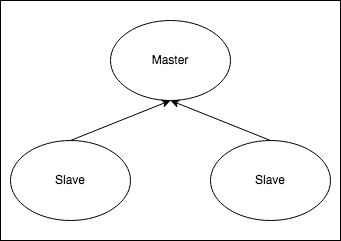
- Redis® Helm Chart will deploy a master-replica cluster, with the option of enabling using Redis® Sentinel.
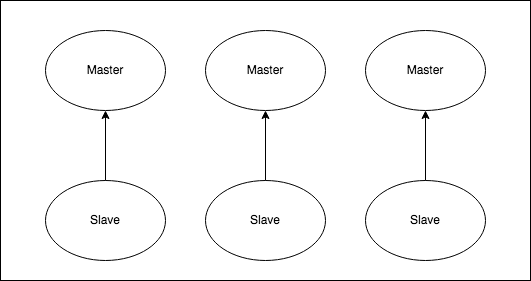
- Redis® Cluster Helm Chart will deploy a Redis® Cluster topology with sharding.
The main features of each chart are the following:
| Redis® | Redis® Cluster |
|---|---|
| Supports multiple databases | Supports only one database. Better if you have a big dataset |
| Single write point (single master) | Multiple write points (multiple masters) |
 |
 |
Prerequisites
- Kubernetes 1.19+
- Helm 3.2.0+
- PV provisioner support in the underlying infrastructure
Installing the Chart
To install the chart with the release name my-release:
$ helm install my-release bitnami/redis
The command deploys Redis® on the Kubernetes cluster in the default configuration. The Parameters section lists the parameters that can be configured during installation.
Tip: List all releases using
helm list
Uninstalling the Chart
To uninstall/delete the my-release deployment:
$ helm delete my-release
The command removes all the Kubernetes components associated with the chart and deletes the release.
Parameters
Global parameters
| Name | Description | Value |
|---|---|---|
global.imageRegistry |
Global Docker image registry | "" |
global.imagePullSecrets |
Global Docker registry secret names as an array | [] |
global.storageClass |
Global StorageClass for Persistent Volume(s) | "" |
global.redis.password |
Global Redis® password (overrides auth.password) |
"" |
Common parameters
| Name | Description | Value |
|---|---|---|
kubeVersion |
Override Kubernetes version | "" |
nameOverride |
String to partially override common.names.fullname | "" |
fullnameOverride |
String to fully override common.names.fullname | "" |
commonLabels |
Labels to add to all deployed objects | {} |
commonAnnotations |
Annotations to add to all deployed objects | {} |
secretAnnotations |
Annotations to add to secret | {} |
clusterDomain |
Kubernetes cluster domain name | cluster.local |
extraDeploy |
Array of extra objects to deploy with the release | [] |
diagnosticMode.enabled |
Enable diagnostic mode (all probes will be disabled and the command will be overridden) | false |
diagnosticMode.command |
Command to override all containers in the deployment | ["sleep"] |
diagnosticMode.args |
Args to override all containers in the deployment | ["infinity"] |
Redis® Image parameters
| Name | Description | Value |
|---|---|---|
image.registry |
Redis® image registry | docker.io |
image.repository |
Redis® image repository | bitnami/redis |
image.tag |
Redis® image tag (immutable tags are recommended) | 7.0.4-debian-11-r11 |
image.pullPolicy |
Redis® image pull policy | IfNotPresent |
image.pullSecrets |
Redis® image pull secrets | [] |
image.debug |
Enable image debug mode | false |
Redis® common configuration parameters
| Name | Description | Value |
|---|---|---|
architecture |
Redis® architecture. Allowed values: standalone or replication |
replication |
auth.enabled |
Enable password authentication | true |
auth.sentinel |
Enable password authentication on sentinels too | true |
auth.password |
Redis® password | "" |
auth.existingSecret |
The name of an existing secret with Redis® credentials | "" |
auth.existingSecretPasswordKey |
Password key to be retrieved from existing secret | "" |
auth.usePasswordFiles |
Mount credentials as files instead of using an environment variable | false |
commonConfiguration |
Common configuration to be added into the ConfigMap | "" |
existingConfigmap |
The name of an existing ConfigMap with your custom configuration for Redis® nodes | "" |
Redis® master configuration parameters
| Name | Description | Value |
|---|---|---|
master.count |
Number of Redis® master instances to deploy (experimental, requires additional configuration) | 1 |
master.configuration |
Configuration for Redis® master nodes | "" |
master.disableCommands |
Array with Redis® commands to disable on master nodes | ["FLUSHDB","FLUSHALL"] |
master.command |
Override default container command (useful when using custom images) | [] |
master.args |
Override default container args (useful when using custom images) | [] |
master.preExecCmds |
Additional commands to run prior to starting Redis® master | [] |
master.extraFlags |
Array with additional command line flags for Redis® master | [] |
master.extraEnvVars |
Array with extra environment variables to add to Redis® master nodes | [] |
master.extraEnvVarsCM |
Name of existing ConfigMap containing extra env vars for Redis® master nodes | "" |
master.extraEnvVarsSecret |
Name of existing Secret containing extra env vars for Redis® master nodes | "" |
master.containerPorts.redis |
Container port to open on Redis® master nodes | 6379 |
master.startupProbe.enabled |
Enable startupProbe on Redis® master nodes | false |
master.startupProbe.initialDelaySeconds |
Initial delay seconds for startupProbe | 20 |
master.startupProbe.periodSeconds |
Period seconds for startupProbe | 5 |
master.startupProbe.timeoutSeconds |
Timeout seconds for startupProbe | 5 |
master.startupProbe.failureThreshold |
Failure threshold for startupProbe | 5 |
master.startupProbe.successThreshold |
Success threshold for startupProbe | 1 |
master.livenessProbe.enabled |
Enable livenessProbe on Redis® master nodes | true |
master.livenessProbe.initialDelaySeconds |
Initial delay seconds for livenessProbe | 20 |
master.livenessProbe.periodSeconds |
Period seconds for livenessProbe | 5 |
master.livenessProbe.timeoutSeconds |
Timeout seconds for livenessProbe | 5 |
master.livenessProbe.failureThreshold |
Failure threshold for livenessProbe | 5 |
master.livenessProbe.successThreshold |
Success threshold for livenessProbe | 1 |
master.readinessProbe.enabled |
Enable readinessProbe on Redis® master nodes | true |
master.readinessProbe.initialDelaySeconds |
Initial delay seconds for readinessProbe | 20 |
master.readinessProbe.periodSeconds |
Period seconds for readinessProbe | 5 |
master.readinessProbe.timeoutSeconds |
Timeout seconds for readinessProbe | 1 |
master.readinessProbe.failureThreshold |
Failure threshold for readinessProbe | 5 |
master.readinessProbe.successThreshold |
Success threshold for readinessProbe | 1 |
master.customStartupProbe |
Custom startupProbe that overrides the default one | {} |
master.customLivenessProbe |
Custom livenessProbe that overrides the default one | {} |
master.customReadinessProbe |
Custom readinessProbe that overrides the default one | {} |
master.resources.limits |
The resources limits for the Redis® master containers | {} |
master.resources.requests |
The requested resources for the Redis® master containers | {} |
master.podSecurityContext.enabled |
Enabled Redis® master pods' Security Context | true |
master.podSecurityContext.fsGroup |
Set Redis® master pod's Security Context fsGroup | 1001 |
master.containerSecurityContext.enabled |
Enabled Redis® master containers' Security Context | true |
master.containerSecurityContext.runAsUser |
Set Redis® master containers' Security Context runAsUser | 1001 |
master.kind |
Use either Deployment or StatefulSet (default) | StatefulSet |
master.schedulerName |
Alternate scheduler for Redis® master pods | "" |
master.updateStrategy.type |
Redis® master statefulset strategy type | RollingUpdate |
master.priorityClassName |
Redis® master pods' priorityClassName | "" |
master.hostAliases |
Redis® master pods host aliases | [] |
master.podLabels |
Extra labels for Redis® master pods | {} |
master.podAnnotations |
Annotations for Redis® master pods | {} |
master.shareProcessNamespace |
Share a single process namespace between all of the containers in Redis® master pods | false |
master.podAffinityPreset |
Pod affinity preset. Ignored if master.affinity is set. Allowed values: soft or hard |
"" |
master.podAntiAffinityPreset |
Pod anti-affinity preset. Ignored if master.affinity is set. Allowed values: soft or hard |
soft |
master.nodeAffinityPreset.type |
Node affinity preset type. Ignored if master.affinity is set. Allowed values: soft or hard |
"" |
master.nodeAffinityPreset.key |
Node label key to match. Ignored if master.affinity is set |
"" |
master.nodeAffinityPreset.values |
Node label values to match. Ignored if master.affinity is set |
[] |
master.affinity |
Affinity for Redis® master pods assignment | {} |
master.nodeSelector |
Node labels for Redis® master pods assignment | {} |
master.tolerations |
Tolerations for Redis® master pods assignment | [] |
master.topologySpreadConstraints |
Spread Constraints for Redis® master pod assignment | [] |
master.dnsPolicy |
DNS Policy for Redis® master pod | "" |
master.dnsConfig |
DNS Configuration for Redis® master pod | {} |
master.lifecycleHooks |
for the Redis® master container(s) to automate configuration before or after startup | {} |
master.extraVolumes |
Optionally specify extra list of additional volumes for the Redis® master pod(s) | [] |
master.extraVolumeMounts |
Optionally specify extra list of additional volumeMounts for the Redis® master container(s) | [] |
master.sidecars |
Add additional sidecar containers to the Redis® master pod(s) | [] |
master.initContainers |
Add additional init containers to the Redis® master pod(s) | [] |
master.persistence.enabled |
Enable persistence on Redis® master nodes using Persistent Volume Claims | true |
master.persistence.medium |
Provide a medium for emptyDir volumes. |
"" |
master.persistence.sizeLimit |
Set this to enable a size limit for emptyDir volumes. |
"" |
master.persistence.path |
The path the volume will be mounted at on Redis® master containers | /data |
master.persistence.subPath |
The subdirectory of the volume to mount on Redis® master containers | "" |
master.persistence.storageClass |
Persistent Volume storage class | "" |
master.persistence.accessModes |
Persistent Volume access modes | ["ReadWriteOnce"] |
master.persistence.size |
Persistent Volume size | 8Gi |
master.persistence.annotations |
Additional custom annotations for the PVC | {} |
master.persistence.selector |
Additional labels to match for the PVC | {} |
master.persistence.dataSource |
Custom PVC data source | {} |
master.persistence.existingClaim |
Use a existing PVC which must be created manually before bound | "" |
master.service.type |
Redis® master service type | ClusterIP |
master.service.ports.redis |
Redis® master service port | 6379 |
master.service.nodePorts.redis |
Node port for Redis® master | "" |
master.service.externalTrafficPolicy |
Redis® master service external traffic policy | Cluster |
master.service.extraPorts |
Extra ports to expose (normally used with the sidecar value) |
[] |
master.service.internalTrafficPolicy |
Redis® master service internal traffic policy (requires Kubernetes v1.22 or greater to be usable) | Cluster |
master.service.clusterIP |
Redis® master service Cluster IP | "" |
master.service.loadBalancerIP |
Redis® master service Load Balancer IP | "" |
master.service.loadBalancerSourceRanges |
Redis® master service Load Balancer sources | [] |
master.service.annotations |
Additional custom annotations for Redis® master service | {} |
master.service.sessionAffinity |
Session Affinity for Kubernetes service, can be "None" or "ClientIP" | None |
master.service.sessionAffinityConfig |
Additional settings for the sessionAffinity | {} |
master.terminationGracePeriodSeconds |
Integer setting the termination grace period for the redis-master pods | 30 |
Redis® replicas configuration parameters
| Name | Description | Value |
|---|---|---|
replica.replicaCount |
Number of Redis® replicas to deploy | 3 |
replica.configuration |
Configuration for Redis® replicas nodes | "" |
replica.disableCommands |
Array with Redis® commands to disable on replicas nodes | ["FLUSHDB","FLUSHALL"] |
replica.command |
Override default container command (useful when using custom images) | [] |
replica.args |
Override default container args (useful when using custom images) | [] |
replica.preExecCmds |
Additional commands to run prior to starting Redis® replicas | [] |
replica.extraFlags |
Array with additional command line flags for Redis® replicas | [] |
replica.extraEnvVars |
Array with extra environment variables to add to Redis® replicas nodes | [] |
replica.extraEnvVarsCM |
Name of existing ConfigMap containing extra env vars for Redis® replicas nodes | "" |
replica.extraEnvVarsSecret |
Name of existing Secret containing extra env vars for Redis® replicas nodes | "" |
replica.externalMaster.enabled |
Use external master for bootstrapping | false |
replica.externalMaster.host |
External master host to bootstrap from | "" |
replica.externalMaster.port |
Port for Redis service external master host | 6379 |
replica.containerPorts.redis |
Container port to open on Redis® replicas nodes | 6379 |
replica.startupProbe.enabled |
Enable startupProbe on Redis® replicas nodes | true |
replica.startupProbe.initialDelaySeconds |
Initial delay seconds for startupProbe | 10 |
replica.startupProbe.periodSeconds |
Period seconds for startupProbe | 10 |
replica.startupProbe.timeoutSeconds |
Timeout seconds for startupProbe | 5 |
replica.startupProbe.failureThreshold |
Failure threshold for startupProbe | 22 |
replica.startupProbe.successThreshold |
Success threshold for startupProbe | 1 |
replica.livenessProbe.enabled |
Enable livenessProbe on Redis® replicas nodes | true |
replica.livenessProbe.initialDelaySeconds |
Initial delay seconds for livenessProbe | 20 |
replica.livenessProbe.periodSeconds |
Period seconds for livenessProbe | 5 |
replica.livenessProbe.timeoutSeconds |
Timeout seconds for livenessProbe | 5 |
replica.livenessProbe.failureThreshold |
Failure threshold for livenessProbe | 5 |
replica.livenessProbe.successThreshold |
Success threshold for livenessProbe | 1 |
replica.readinessProbe.enabled |
Enable readinessProbe on Redis® replicas nodes | true |
replica.readinessProbe.initialDelaySeconds |
Initial delay seconds for readinessProbe | 20 |
replica.readinessProbe.periodSeconds |
Period seconds for readinessProbe | 5 |
replica.readinessProbe.timeoutSeconds |
Timeout seconds for readinessProbe | 1 |
replica.readinessProbe.failureThreshold |
Failure threshold for readinessProbe | 5 |
replica.readinessProbe.successThreshold |
Success threshold for readinessProbe | 1 |
replica.customStartupProbe |
Custom startupProbe that overrides the default one | {} |
replica.customLivenessProbe |
Custom livenessProbe that overrides the default one | {} |
replica.customReadinessProbe |
Custom readinessProbe that overrides the default one | {} |
replica.resources.limits |
The resources limits for the Redis® replicas containers | {} |
replica.resources.requests |
The requested resources for the Redis® replicas containers | {} |
replica.podSecurityContext.enabled |
Enabled Redis® replicas pods' Security Context | true |
replica.podSecurityContext.fsGroup |
Set Redis® replicas pod's Security Context fsGroup | 1001 |
replica.containerSecurityContext.enabled |
Enabled Redis® replicas containers' Security Context | true |
replica.containerSecurityContext.runAsUser |
Set Redis® replicas containers' Security Context runAsUser | 1001 |
replica.schedulerName |
Alternate scheduler for Redis® replicas pods | "" |
replica.updateStrategy.type |
Redis® replicas statefulset strategy type | RollingUpdate |
replica.priorityClassName |
Redis® replicas pods' priorityClassName | "" |
replica.podManagementPolicy |
podManagementPolicy to manage scaling operation of %%MAIN_CONTAINER_NAME%% pods | "" |
replica.hostAliases |
Redis® replicas pods host aliases | [] |
replica.podLabels |
Extra labels for Redis® replicas pods | {} |
replica.podAnnotations |
Annotations for Redis® replicas pods | {} |
replica.shareProcessNamespace |
Share a single process namespace between all of the containers in Redis® replicas pods | false |
replica.podAffinityPreset |
Pod affinity preset. Ignored if replica.affinity is set. Allowed values: soft or hard |
"" |
replica.podAntiAffinityPreset |
Pod anti-affinity preset. Ignored if replica.affinity is set. Allowed values: soft or hard |
soft |
replica.nodeAffinityPreset.type |
Node affinity preset type. Ignored if replica.affinity is set. Allowed values: soft or hard |
"" |
replica.nodeAffinityPreset.key |
Node label key to match. Ignored if replica.affinity is set |
"" |
replica.nodeAffinityPreset.values |
Node label values to match. Ignored if replica.affinity is set |
[] |
replica.affinity |
Affinity for Redis® replicas pods assignment | {} |
replica.nodeSelector |
Node labels for Redis® replicas pods assignment | {} |
replica.tolerations |
Tolerations for Redis® replicas pods assignment | [] |
replica.topologySpreadConstraints |
Spread Constraints for Redis® replicas pod assignment | [] |
replica.dnsPolicy |
DNS Policy for Redis® replica pods | "" |
replica.dnsConfig |
DNS Configuration for Redis® replica pods | {} |
replica.lifecycleHooks |
for the Redis® replica container(s) to automate configuration before or after startup | {} |
replica.extraVolumes |
Optionally specify extra list of additional volumes for the Redis® replicas pod(s) | [] |
replica.extraVolumeMounts |
Optionally specify extra list of additional volumeMounts for the Redis® replicas container(s) | [] |
replica.sidecars |
Add additional sidecar containers to the Redis® replicas pod(s) | [] |
replica.initContainers |
Add additional init containers to the Redis® replicas pod(s) | [] |
replica.persistence.enabled |
Enable persistence on Redis® replicas nodes using Persistent Volume Claims | true |
replica.persistence.medium |
Provide a medium for emptyDir volumes. |
"" |
replica.persistence.sizeLimit |
Set this to enable a size limit for emptyDir volumes. |
"" |
replica.persistence.path |
The path the volume will be mounted at on Redis® replicas containers | /data |
replica.persistence.subPath |
The subdirectory of the volume to mount on Redis® replicas containers | "" |
replica.persistence.storageClass |
Persistent Volume storage class | "" |
replica.persistence.accessModes |
Persistent Volume access modes | ["ReadWriteOnce"] |
replica.persistence.size |
Persistent Volume size | 8Gi |
replica.persistence.annotations |
Additional custom annotations for the PVC | {} |
replica.persistence.selector |
Additional labels to match for the PVC | {} |
replica.persistence.dataSource |
Custom PVC data source | {} |
replica.persistence.existingClaim |
Use a existing PVC which must be created manually before bound | "" |
replica.service.type |
Redis® replicas service type | ClusterIP |
replica.service.ports.redis |
Redis® replicas service port | 6379 |
replica.service.nodePorts.redis |
Node port for Redis® replicas | "" |
replica.service.externalTrafficPolicy |
Redis® replicas service external traffic policy | Cluster |
replica.service.internalTrafficPolicy |
Redis® replicas service internal traffic policy (requires Kubernetes v1.22 or greater to be usable) | Cluster |
replica.service.extraPorts |
Extra ports to expose (normally used with the sidecar value) |
[] |
replica.service.clusterIP |
Redis® replicas service Cluster IP | "" |
replica.service.loadBalancerIP |
Redis® replicas service Load Balancer IP | "" |
replica.service.loadBalancerSourceRanges |
Redis® replicas service Load Balancer sources | [] |
replica.service.annotations |
Additional custom annotations for Redis® replicas service | {} |
replica.service.sessionAffinity |
Session Affinity for Kubernetes service, can be "None" or "ClientIP" | None |
replica.service.sessionAffinityConfig |
Additional settings for the sessionAffinity | {} |
replica.terminationGracePeriodSeconds |
Integer setting the termination grace period for the redis-replicas pods | 30 |
replica.autoscaling.enabled |
Enable replica autoscaling settings | false |
replica.autoscaling.minReplicas |
Minimum replicas for the pod autoscaling | 1 |
replica.autoscaling.maxReplicas |
Maximum replicas for the pod autoscaling | 11 |
replica.autoscaling.targetCPU |
Percentage of CPU to consider when autoscaling | "" |
replica.autoscaling.targetMemory |
Percentage of Memory to consider when autoscaling | "" |
Redis® Sentinel configuration parameters
| Name | Description | Value |
|---|---|---|
sentinel.enabled |
Use Redis® Sentinel on Redis® pods. | false |
sentinel.image.registry |
Redis® Sentinel image registry | docker.io |
sentinel.image.repository |
Redis® Sentinel image repository | bitnami/redis-sentinel |
sentinel.image.tag |
Redis® Sentinel image tag (immutable tags are recommended) | 7.0.4-debian-11-r8 |
sentinel.image.pullPolicy |
Redis® Sentinel image pull policy | IfNotPresent |
sentinel.image.pullSecrets |
Redis® Sentinel image pull secrets | [] |
sentinel.image.debug |
Enable image debug mode | false |
sentinel.masterSet |
Master set name | mymaster |
sentinel.quorum |
Sentinel Quorum | 2 |
sentinel.getMasterTimeout |
Amount of time to allow before get_sentinel_master_info() times out. | 220 |
sentinel.automateClusterRecovery |
Automate cluster recovery in cases where the last replica is not considered a good replica and Sentinel won't automatically failover to it. | false |
sentinel.downAfterMilliseconds |
Timeout for detecting a Redis® node is down | 60000 |
sentinel.failoverTimeout |
Timeout for performing a election failover | 18000 |
sentinel.parallelSyncs |
Number of replicas that can be reconfigured in parallel to use the new master after a failover | 1 |
sentinel.configuration |
Configuration for Redis® Sentinel nodes | "" |
sentinel.command |
Override default container command (useful when using custom images) | [] |
sentinel.args |
Override default container args (useful when using custom images) | [] |
sentinel.preExecCmds |
Additional commands to run prior to starting Redis® Sentinel | [] |
sentinel.extraEnvVars |
Array with extra environment variables to add to Redis® Sentinel nodes | [] |
sentinel.extraEnvVarsCM |
Name of existing ConfigMap containing extra env vars for Redis® Sentinel nodes | "" |
sentinel.extraEnvVarsSecret |
Name of existing Secret containing extra env vars for Redis® Sentinel nodes | "" |
sentinel.externalMaster.enabled |
Use external master for bootstrapping | false |
sentinel.externalMaster.host |
External master host to bootstrap from | "" |
sentinel.externalMaster.port |
Port for Redis service external master host | 6379 |
sentinel.containerPorts.sentinel |
Container port to open on Redis® Sentinel nodes | 26379 |
sentinel.startupProbe.enabled |
Enable startupProbe on Redis® Sentinel nodes | true |
sentinel.startupProbe.initialDelaySeconds |
Initial delay seconds for startupProbe | 10 |
sentinel.startupProbe.periodSeconds |
Period seconds for startupProbe | 10 |
sentinel.startupProbe.timeoutSeconds |
Timeout seconds for startupProbe | 5 |
sentinel.startupProbe.failureThreshold |
Failure threshold for startupProbe | 22 |
sentinel.startupProbe.successThreshold |
Success threshold for startupProbe | 1 |
sentinel.livenessProbe.enabled |
Enable livenessProbe on Redis® Sentinel nodes | true |
sentinel.livenessProbe.initialDelaySeconds |
Initial delay seconds for livenessProbe | 20 |
sentinel.livenessProbe.periodSeconds |
Period seconds for livenessProbe | 5 |
sentinel.livenessProbe.timeoutSeconds |
Timeout seconds for livenessProbe | 5 |
sentinel.livenessProbe.failureThreshold |
Failure threshold for livenessProbe | 5 |
sentinel.livenessProbe.successThreshold |
Success threshold for livenessProbe | 1 |
sentinel.readinessProbe.enabled |
Enable readinessProbe on Redis® Sentinel nodes | true |
sentinel.readinessProbe.initialDelaySeconds |
Initial delay seconds for readinessProbe | 20 |
sentinel.readinessProbe.periodSeconds |
Period seconds for readinessProbe | 5 |
sentinel.readinessProbe.timeoutSeconds |
Timeout seconds for readinessProbe | 1 |
sentinel.readinessProbe.failureThreshold |
Failure threshold for readinessProbe | 5 |
sentinel.readinessProbe.successThreshold |
Success threshold for readinessProbe | 1 |
sentinel.customStartupProbe |
Custom startupProbe that overrides the default one | {} |
sentinel.customLivenessProbe |
Custom livenessProbe that overrides the default one | {} |
sentinel.customReadinessProbe |
Custom readinessProbe that overrides the default one | {} |
sentinel.persistence.enabled |
Enable persistence on Redis® sentinel nodes using Persistent Volume Claims (Experimental) | false |
sentinel.persistence.storageClass |
Persistent Volume storage class | "" |
sentinel.persistence.accessModes |
Persistent Volume access modes | ["ReadWriteOnce"] |
sentinel.persistence.size |
Persistent Volume size | 100Mi |
sentinel.persistence.annotations |
Additional custom annotations for the PVC | {} |
sentinel.persistence.selector |
Additional labels to match for the PVC | {} |
sentinel.persistence.dataSource |
Custom PVC data source | {} |
sentinel.persistence.medium |
Provide a medium for emptyDir volumes. |
"" |
sentinel.resources.limits |
The resources limits for the Redis® Sentinel containers | {} |
sentinel.resources.requests |
The requested resources for the Redis® Sentinel containers | {} |
sentinel.containerSecurityContext.enabled |
Enabled Redis® Sentinel containers' Security Context | true |
sentinel.containerSecurityContext.runAsUser |
Set Redis® Sentinel containers' Security Context runAsUser | 1001 |
sentinel.lifecycleHooks |
for the Redis® sentinel container(s) to automate configuration before or after startup | {} |
sentinel.extraVolumes |
Optionally specify extra list of additional volumes for the Redis® Sentinel | [] |
sentinel.extraVolumeMounts |
Optionally specify extra list of additional volumeMounts for the Redis® Sentinel container(s) | [] |
sentinel.service.type |
Redis® Sentinel service type | ClusterIP |
sentinel.service.ports.redis |
Redis® service port for Redis® | 6379 |
sentinel.service.ports.sentinel |
Redis® service port for Redis® Sentinel | 26379 |
sentinel.service.nodePorts.redis |
Node port for Redis® | "" |
sentinel.service.nodePorts.sentinel |
Node port for Sentinel | "" |
sentinel.service.externalTrafficPolicy |
Redis® Sentinel service external traffic policy | Cluster |
sentinel.service.extraPorts |
Extra ports to expose (normally used with the sidecar value) |
[] |
sentinel.service.clusterIP |
Redis® Sentinel service Cluster IP | "" |
sentinel.service.loadBalancerIP |
Redis® Sentinel service Load Balancer IP | "" |
sentinel.service.loadBalancerSourceRanges |
Redis® Sentinel service Load Balancer sources | [] |
sentinel.service.annotations |
Additional custom annotations for Redis® Sentinel service | {} |
sentinel.service.sessionAffinity |
Session Affinity for Kubernetes service, can be "None" or "ClientIP" | None |
sentinel.service.sessionAffinityConfig |
Additional settings for the sessionAffinity | {} |
sentinel.terminationGracePeriodSeconds |
Integer setting the termination grace period for the redis-node pods | 30 |
Other Parameters
| Name | Description | Value |
|---|---|---|
networkPolicy.enabled |
Enable creation of NetworkPolicy resources | false |
networkPolicy.allowExternal |
Don't require client label for connections | true |
networkPolicy.extraIngress |
Add extra ingress rules to the NetworkPolicy | [] |
networkPolicy.extraEgress |
Add extra egress rules to the NetworkPolicy | [] |
networkPolicy.ingressNSMatchLabels |
Labels to match to allow traffic from other namespaces | {} |
networkPolicy.ingressNSPodMatchLabels |
Pod labels to match to allow traffic from other namespaces | {} |
podSecurityPolicy.create |
Whether to create a PodSecurityPolicy. WARNING: PodSecurityPolicy is deprecated in Kubernetes v1.21 or later, unavailable in v1.25 or later | false |
podSecurityPolicy.enabled |
Enable PodSecurityPolicy's RBAC rules | false |
rbac.create |
Specifies whether RBAC resources should be created | false |
rbac.rules |
Custom RBAC rules to set | [] |
serviceAccount.create |
Specifies whether a ServiceAccount should be created | true |
serviceAccount.name |
The name of the ServiceAccount to use. | "" |
serviceAccount.automountServiceAccountToken |
Whether to auto mount the service account token | true |
serviceAccount.annotations |
Additional custom annotations for the ServiceAccount | {} |
pdb.create |
Specifies whether a PodDisruptionBudget should be created | false |
pdb.minAvailable |
Min number of pods that must still be available after the eviction | 1 |
pdb.maxUnavailable |
Max number of pods that can be unavailable after the eviction | "" |
tls.enabled |
Enable TLS traffic | false |
tls.authClients |
Require clients to authenticate | true |
tls.autoGenerated |
Enable autogenerated certificates | false |
tls.existingSecret |
The name of the existing secret that contains the TLS certificates | "" |
tls.certificatesSecret |
DEPRECATED. Use existingSecret instead. | "" |
tls.certFilename |
Certificate filename | "" |
tls.certKeyFilename |
Certificate Key filename | "" |
tls.certCAFilename |
CA Certificate filename | "" |
tls.dhParamsFilename |
File containing DH params (in order to support DH based ciphers) | "" |
Metrics Parameters
| Name | Description | Value |
|---|---|---|
metrics.enabled |
Start a sidecar prometheus exporter to expose Redis® metrics | false |
metrics.image.registry |
Redis® Exporter image registry | docker.io |
metrics.image.repository |
Redis® Exporter image repository | bitnami/redis-exporter |
metrics.image.tag |
Redis® Redis® Exporter image tag (immutable tags are recommended) | 1.43.0-debian-11-r18 |
metrics.image.pullPolicy |
Redis® Exporter image pull policy | IfNotPresent |
metrics.image.pullSecrets |
Redis® Exporter image pull secrets | [] |
metrics.command |
Override default metrics container init command (useful when using custom images) | [] |
metrics.redisTargetHost |
A way to specify an alternative Redis® hostname | localhost |
metrics.extraArgs |
Extra arguments for Redis® exporter, for example: | {} |
metrics.extraEnvVars |
Array with extra environment variables to add to Redis® exporter | [] |
metrics.containerSecurityContext.enabled |
Enabled Redis® exporter containers' Security Context | true |
metrics.containerSecurityContext.runAsUser |
Set Redis® exporter containers' Security Context runAsUser | 1001 |
metrics.extraVolumes |
Optionally specify extra list of additional volumes for the Redis® metrics sidecar | [] |
metrics.extraVolumeMounts |
Optionally specify extra list of additional volumeMounts for the Redis® metrics sidecar | [] |
metrics.resources.limits |
The resources limits for the Redis® exporter container | {} |
metrics.resources.requests |
The requested resources for the Redis® exporter container | {} |
metrics.podLabels |
Extra labels for Redis® exporter pods | {} |
metrics.podAnnotations |
Annotations for Redis® exporter pods | {} |
metrics.service.type |
Redis® exporter service type | ClusterIP |
metrics.service.port |
Redis® exporter service port | 9121 |
metrics.service.externalTrafficPolicy |
Redis® exporter service external traffic policy | Cluster |
metrics.service.extraPorts |
Extra ports to expose (normally used with the sidecar value) |
[] |
metrics.service.loadBalancerIP |
Redis® exporter service Load Balancer IP | "" |
metrics.service.loadBalancerSourceRanges |
Redis® exporter service Load Balancer sources | [] |
metrics.service.annotations |
Additional custom annotations for Redis® exporter service | {} |
metrics.serviceMonitor.enabled |
Create ServiceMonitor resource(s) for scraping metrics using PrometheusOperator | false |
metrics.serviceMonitor.namespace |
The namespace in which the ServiceMonitor will be created | "" |
metrics.serviceMonitor.interval |
The interval at which metrics should be scraped | 30s |
metrics.serviceMonitor.scrapeTimeout |
The timeout after which the scrape is ended | "" |
metrics.serviceMonitor.relabellings |
Metrics RelabelConfigs to apply to samples before scraping. | [] |
metrics.serviceMonitor.metricRelabelings |
Metrics RelabelConfigs to apply to samples before ingestion. | [] |
metrics.serviceMonitor.honorLabels |
Specify honorLabels parameter to add the scrape endpoint | false |
metrics.serviceMonitor.additionalLabels |
Additional labels that can be used so ServiceMonitor resource(s) can be discovered by Prometheus | {} |
metrics.prometheusRule.enabled |
Create a custom prometheusRule Resource for scraping metrics using PrometheusOperator | false |
metrics.prometheusRule.namespace |
The namespace in which the prometheusRule will be created | "" |
metrics.prometheusRule.additionalLabels |
Additional labels for the prometheusRule | {} |
metrics.prometheusRule.rules |
Custom Prometheus rules | [] |
Init Container Parameters
| Name | Description | Value |
|---|---|---|
volumePermissions.enabled |
Enable init container that changes the owner/group of the PV mount point to runAsUser:fsGroup |
false |
volumePermissions.image.registry |
Bitnami Shell image registry | docker.io |
volumePermissions.image.repository |
Bitnami Shell image repository | bitnami/bitnami-shell |
volumePermissions.image.tag |
Bitnami Shell image tag (immutable tags are recommended) | 11-debian-11-r23 |
volumePermissions.image.pullPolicy |
Bitnami Shell image pull policy | IfNotPresent |
volumePermissions.image.pullSecrets |
Bitnami Shell image pull secrets | [] |
volumePermissions.resources.limits |
The resources limits for the init container | {} |
volumePermissions.resources.requests |
The requested resources for the init container | {} |
volumePermissions.containerSecurityContext.runAsUser |
Set init container's Security Context runAsUser | 0 |
sysctl.enabled |
Enable init container to modify Kernel settings | false |
sysctl.image.registry |
Bitnami Shell image registry | docker.io |
sysctl.image.repository |
Bitnami Shell image repository | bitnami/bitnami-shell |
sysctl.image.tag |
Bitnami Shell image tag (immutable tags are recommended) | 11-debian-11-r23 |
sysctl.image.pullPolicy |
Bitnami Shell image pull policy | IfNotPresent |
sysctl.image.pullSecrets |
Bitnami Shell image pull secrets | [] |
sysctl.command |
Override default init-sysctl container command (useful when using custom images) | [] |
sysctl.mountHostSys |
Mount the host /sys folder to /host-sys |
false |
sysctl.resources.limits |
The resources limits for the init container | {} |
sysctl.resources.requests |
The requested resources for the init container | {} |
useExternalDNS Parameters
| Name | Description | Value |
|---|---|---|
useExternalDNS.enabled |
Enable various syntax that would enable external-dns to work. Note this requires a working installation of external-dns to be usable. |
false |
useExternalDNS.additionalAnnotations |
Extra annotations to be utilized when external-dns is enabled. |
{} |
useExternalDNS.annotationKey |
The annotation key utilized when external-dns is enabled. |
external-dns.alpha.kubernetes.io/ |
useExternalDNS.suffix |
The DNS suffix utilized when external-dns is enabled. Note that we prepend the suffix with the full name of the release. |
"" |
Specify each parameter using the --set key=value[,key=value] argument to helm install. For example,
$ helm install my-release \
  --set auth.password=secretpassword \
    bitnami/redis
The above command sets the Redis® server password to secretpassword.
NOTE: Once this chart is deployed, it is not possible to change the application's access credentials, such as usernames or passwords, using Helm. To change these application credentials after deployment, delete any persistent volumes (PVs) used by the chart and re-deploy it, or use the application's built-in administrative tools if available.
Alternatively, a YAML file that specifies the values for the parameters can be provided while installing the chart. For example,
$ helm install my-release -f values.yaml bitnami/redis
Tip: You can use the default values.yaml
Configuration and installation details
Rolling VS Immutable tags
It is strongly recommended to use immutable tags in a production environment. This ensures your deployment does not change automatically if the same tag is updated with a different image.
Bitnami will release a new chart updating its containers if a new version of the main container, significant changes, or critical vulnerabilities exist.
Use a different Redis® version
To modify the application version used in this chart, specify a different version of the image using the image.tag parameter and/or a different repository using the image.repository parameter. Refer to the chart documentation for more information on these parameters and how to use them with images from a private registry.
Bootstrapping with an External Cluster
This chart is equipped with the ability to bring online a set of Pods that connect to an existing Redis deployment that lies outside of Kubernetes. This effectively creates a hybrid Redis Deployment where both Pods in Kubernetes and Instances such as Virtual Machines can partake in a single Redis Deployment. This is helpful in situations where one may be migrating Redis from Virtual Machines into Kubernetes, for example. To take advantage of this, use the following as an example configuration:
replica:
  externalMaster:
    enabled: true
    host: external-redis-0.internal
sentinel:
  externalMaster:
    enabled: true
    host: external-redis-0.internal
⚠️ This is currently limited to clusters in which Sentinel and Redis run on the same node! ⚠️
Please also note that the external sentinel must be listening on port 26379, and this is currently not configurable.
Once the Kubernetes Redis Deployment is online and confirmed to be working with the existing cluster, the configuration can then be removed and the cluster will remain connected.
External DNS
This chart is equipped to allow leveraging the ExternalDNS project. Doing so will enable ExternalDNS to publish the FQDN for each instance, in the format of <pod-name>.<release-name>.<dns-suffix>.
Example, when using the following configuration:
useExternalDNS:
  enabled: true
  suffix: prod.example.org
  additionalAnnotations:
    ttl: 10
On a cluster where the name of the Helm release is a, the hostname of a Pod is generated as: a-redis-node-0.a-redis.prod.example.org. The IP of that FQDN will match that of the associated Pod. This modifies the following parameters of the Redis/Sentinel configuration using this new FQDN:
replica-announce-ipknown-sentinelknown-replicaannounce-ip
⚠️ This requires a working installation of external-dns to be fully functional. ⚠️
See the official ExternalDNS documentation for additional configuration options.
Cluster topologies
Default: Master-Replicas
When installing the chart with architecture=replication, it will deploy a Redis® master StatefulSet and a Redis® replicas StatefulSet. The replicas will be read-replicas of the master. Two services will be exposed:
- Redis® Master service: Points to the master, where read-write operations can be performed
- Redis® Replicas service: Points to the replicas, where only read operations are allowed by default.
In case the master crashes, the replicas will wait until the master node is respawned again by the Kubernetes Controller Manager.
Standalone
When installing the chart with architecture=standalone, it will deploy a standalone Redis® StatefulSet. A single service will be exposed:
- Redis® Master service: Points to the master, where read-write operations can be performed
Master-Replicas with Sentinel
When installing the chart with architecture=replication and sentinel.enabled=true, it will deploy a Redis® master StatefulSet (only one master allowed) and a Redis® replicas StatefulSet. In this case, the pods will contain an extra container with Redis® Sentinel. This container will form a cluster of Redis® Sentinel nodes, which will promote a new master in case the actual one fails. In addition to this, only one service is exposed:
- Redis® service: Exposes port 6379 for Redis® read-only operations and port 26379 for accessing Redis® Sentinel.
For read-only operations, access the service using port 6379. For write operations, it's necessary to access the Redis® Sentinel cluster and query the current master using the command below (using redis-cli or similar):
SENTINEL get-master-addr-by-name <name of your MasterSet. e.g: mymaster>
This command will return the address of the current master, which can be accessed from inside the cluster.
In case the current master crashes, the Sentinel containers will elect a new master node.
master.count greater than 1 is not designed for use when sentinel.enabled=true.
Multiple masters (experimental)
When master.count is greater than 1, special care must be taken to create a consistent setup.
An example of use case is the creation of a redundant set of standalone masters or master-replicas per Kubernetes node where you must ensure:
- No more than
1master can be deployed per Kubernetes node - Replicas and writers can only see the single master of their own Kubernetes node
One way of achieving this is by setting master.service.internalTrafficPolicy=Local in combination with a master.affinity.podAntiAffinity spec to never schedule more than one master per Kubernetes node.
It's recommended to only change master.count if you know what you are doing.
master.count greater than 1 is not designed for use when sentinel.enabled=true.
Using a password file
To use a password file for Redis® you need to create a secret containing the password and then deploy the chart using that secret.
Refer to the chart documentation for more information on using a password file for Redis®.
Securing traffic using TLS
TLS support can be enabled in the chart by specifying the tls. parameters while creating a release. The following parameters should be configured to properly enable the TLS support in the chart:
tls.enabled: Enable TLS support. Defaults tofalsetls.existingSecret: Name of the secret that contains the certificates. No defaults.tls.certFilename: Certificate filename. No defaults.tls.certKeyFilename: Certificate key filename. No defaults.tls.certCAFilename: CA Certificate filename. No defaults.
Refer to the chart documentation for more information on creating the secret and a TLS deployment example.
Metrics
The chart optionally can start a metrics exporter for prometheus. The metrics endpoint (port 9121) is exposed in the service. Metrics can be scraped from within the cluster using something similar as the described in the example Prometheus scrape configuration. If metrics are to be scraped from outside the cluster, the Kubernetes API proxy can be utilized to access the endpoint.
If you have enabled TLS by specifying tls.enabled=true you also need to specify TLS option to the metrics exporter. You can do that via metrics.extraArgs. You can find the metrics exporter CLI flags for TLS here. For example:
You can either specify metrics.extraArgs.skip-tls-verification=true to skip TLS verification or providing the following values under metrics.extraArgs for TLS client authentication:
tls-client-key-file
tls-client-cert-file
tls-ca-cert-file
Host Kernel Settings
Redis® may require some changes in the kernel of the host machine to work as expected, in particular increasing the somaxconn value and disabling transparent huge pages.
Refer to the chart documentation for more information on configuring host kernel settings with an example.
Persistence
By default, the chart mounts a Persistent Volume at the /data path. The volume is created using dynamic volume provisioning. If a Persistent Volume Claim already exists, specify it during installation.
Existing PersistentVolumeClaim
- Create the PersistentVolume
- Create the PersistentVolumeClaim
- Install the chart
$ helm install my-release --set master.persistence.existingClaim=PVC_NAME bitnami/redis
Backup and restore
Refer to the chart documentation for more information on backing up and restoring Redis® deployments.
NetworkPolicy
To enable network policy for Redis®, install a networking plugin that implements the Kubernetes NetworkPolicy spec, and set networkPolicy.enabled to true.
Refer to the chart documenation for more information on enabling the network policy in Redis® deployments.
Setting Pod's affinity
This chart allows you to set your custom affinity using the XXX.affinity parameter(s). Find more information about Pod's affinity in the Kubernetes documentation.
As an alternative, you can use of the preset configurations for pod affinity, pod anti-affinity, and node affinity available at the bitnami/common chart. To do so, set the XXX.podAffinityPreset, XXX.podAntiAffinityPreset, or XXX.nodeAffinityPreset parameters.
Troubleshooting
Find more information about how to deal with common errors related to Bitnami's Helm charts in this troubleshooting guide.
Upgrading
A major chart version change (like v1.2.3 -> v2.0.0) indicates that there is an incompatible breaking change needing manual actions.
To 16.0.0
This major release renames several values in this chart and adds missing features, in order to be inline with the rest of assets in the Bitnami charts repository.
Affected values:
master.service.portrenamed asmaster.service.ports.redis.master.service.nodePortrenamed asmaster.service.nodePorts.redis.replica.service.portrenamed asreplica.service.ports.redis.replica.service.nodePortrenamed asreplica.service.nodePorts.redis.sentinel.service.portrenamed assentinel.service.ports.redis.sentinel.service.sentinelPortrenamed assentinel.service.ports.sentinel.master.containerPortrenamed asmaster.containerPorts.redis.replica.containerPortrenamed asreplica.containerPorts.redis.sentinel.containerPortrenamed assentinel.containerPorts.sentinel.master.spreadConstraintsrenamed asmaster.topologySpreadConstraintsreplica.spreadConstraintsrenamed asreplica.topologySpreadConstraints
To 15.0.0
The parameter to enable the usage of StaticIDs was removed. The behavior is to always use StaticIDs.
To 14.8.0
The Redis® sentinel exporter was removed in this version because the upstream project was deprecated. The regular Redis® exporter is included in the sentinel scenario as usual.
To 14.0.0
- Several parameters were renamed or disappeared in favor of new ones on this major version:
- The term slave has been replaced by the term replica. Therefore, parameters prefixed with
slaveare now prefixed withreplicas. - Credentials parameter are reorganized under the
authparameter. cluster.enabledparameter is deprecated in favor ofarchitectureparameter that accepts two values:standaloneandreplication.securityContext.*is deprecated in favor ofXXX.podSecurityContextandXXX.containerSecurityContext.sentinel.metrics.*parameters are deprecated in favor ofmetrics.sentinel.*ones.
- The term slave has been replaced by the term replica. Therefore, parameters prefixed with
- New parameters to add custom command, environment variables, sidecars, init containers, etc. were added.
- Chart labels were adapted to follow the Helm charts standard labels.
- values.yaml metadata was adapted to follow the format supported by Readme Generator for Helm.
Consequences:
Backwards compatibility is not guaranteed. To upgrade to 14.0.0, install a new release of the Redis® chart, and migrate the data from your previous release. You have 2 alternatives to do so:
- Create a backup of the database, and restore it on the new release as explained in the Backup and restore section.
- Reuse the PVC used to hold the master data on your previous release. To do so, use the
master.persistence.existingClaimparameter. The following example assumes that the release name isredis:
$ helm install redis bitnami/redis --set auth.password=[PASSWORD] --set master.persistence.existingClaim=[EXISTING_PVC]
| Note: you need to substitute the placeholder [EXISTING_PVC] with the name of the PVC used on your previous release, and [PASSWORD] with the password used in your previous release.
To 13.0.0
This major version updates the Redis® docker image version used from 6.0 to 6.2, the new stable version. There are no major changes in the chart and there shouldn't be any breaking changes in it as 6.2 is basically a stricter superset of 6.0. For more information, please refer to Redis® 6.2 release notes.
To 12.3.0
This version also introduces bitnami/common, a library chart as a dependency. More documentation about this new utility could be found here. Please, make sure that you have updated the chart dependencies before executing any upgrade.
To 12.0.0
On November 13, 2020, Helm v2 support was formally finished, this major version is the result of the required changes applied to the Helm Chart to be able to incorporate the different features added in Helm v3 and to be consistent with the Helm project itself regarding the Helm v2 EOL.
What changes were introduced in this major version?
- Previous versions of this Helm Chart use
apiVersion: v1(installable by both Helm 2 and 3), this Helm Chart was updated toapiVersion: v2(installable by Helm 3 only). Here you can find more information about theapiVersionfield. - The different fields present in the Chart.yaml file has been ordered alphabetically in a homogeneous way for all the Bitnami Helm Charts
Considerations when upgrading to this version
- If you want to upgrade to this version from a previous one installed with Helm v3, you shouldn't face any issues
- If you want to upgrade to this version using Helm v2, this scenario is not supported as this version doesn't support Helm v2 anymore
- If you installed the previous version with Helm v2 and wants to upgrade to this version with Helm v3, please refer to the official Helm documentation about migrating from Helm v2 to v3
Useful links
- https://docs.bitnami.com/tutorials/resolve-helm2-helm3-post-migration-issues/
- https://helm.sh/docs/topics/v2_v3_migration/
- https://helm.sh/blog/migrate-from-helm-v2-to-helm-v3/
To 11.0.0
When deployed with sentinel enabled, only a group of nodes is deployed and the master/slave role is handled in the group. To avoid breaking the compatibility, the settings for this nodes are given through the slave.xxxx parameters in values.yaml
To 9.0.0
The metrics exporter has been changed from a separate deployment to a sidecar container, due to the latest changes in the Redis® exporter code. Check the official page for more information. The metrics container image was changed from oliver006/redis_exporter to bitnami/redis-exporter (Bitnami's maintained package of oliver006/redis_exporter).
To 7.0.0
In order to improve the performance in case of slave failure, we added persistence to the read-only slaves. That means that we moved from Deployment to StatefulSets. This should not affect upgrades from previous versions of the chart, as the deployments did not contain any persistence at all.
This version also allows enabling Redis® Sentinel containers inside of the Redis® Pods (feature disabled by default). In case the master crashes, a new Redis® node will be elected as master. In order to query the current master (no redis master service is exposed), you need to query first the Sentinel cluster.
To 11.0.0
When using sentinel, a new statefulset called -node was introduced. This will break upgrading from a previous version where the statefulsets are called master and slave. Hence the PVC will not match the new naming and won't be reused. If you want to keep your data, you will need to perform a backup and then a restore the data in this new version.
To 10.0.0
For releases with usePassword: true, the value sentinel.usePassword controls whether the password authentication also applies to the sentinel port. This defaults to true for a secure configuration, however it is possible to disable to account for the following cases:
- Using a version of redis-sentinel prior to
5.0.1where the authentication feature was introduced. - Where redis clients need to be updated to support sentinel authentication.
If using a master/slave topology, or with usePassword: false, no action is required.
To 8.0.18
For releases with metrics.enabled: true the default tag for the exporter image is now v1.x.x. This introduces many changes including metrics names. You'll want to use this dashboard now. Please see the redis_exporter github page for more details.
To 7.0.0
This version causes a change in the Redis® Master StatefulSet definition, so the command helm upgrade would not work out of the box. As an alternative, one of the following could be done:
-
Recommended: Create a clone of the Redis® Master PVC (for example, using projects like this one). Then launch a fresh release reusing this cloned PVC.
helm install my-release bitnami/redis --set persistence.existingClaim=<NEW PVC> -
Alternative (not recommended, do at your own risk):
helm delete --purgedoes not remove the PVC assigned to the Redis® Master StatefulSet. As a consequence, the following commands can be done to upgrade the releasehelm delete --purge <RELEASE> helm install <RELEASE> bitnami/redis
Previous versions of the chart were not using persistence in the slaves, so this upgrade would add it to them. Another important change is that no values are inherited from master to slaves. For example, in 6.0.0 slaves.readinessProbe.periodSeconds, if empty, would be set to master.readinessProbe.periodSeconds. This approach lacked transparency and was difficult to maintain. From now on, all the slave parameters must be configured just as it is done with the masters.
Some values have changed as well:
master.portandslave.porthave been changed toredisPort(same value for both master and slaves)master.securityContextandslave.securityContexthave been changed tosecurityContext(same values for both master and slaves)
By default, the upgrade will not change the cluster topology. In case you want to use Redis® Sentinel, you must explicitly set sentinel.enabled to true.
To 6.0.0
Previous versions of the chart were using an init-container to change the permissions of the volumes. This was done in case the securityContext directive in the template was not enough for that (for example, with cephFS). In this new version of the chart, this container is disabled by default (which should not affect most of the deployments). If your installation still requires that init container, execute helm upgrade with the --set volumePermissions.enabled=true.
To 5.0.0
The default image in this release may be switched out for any image containing the redis-server
and redis-cli binaries. If redis-server is not the default image ENTRYPOINT, master.command
must be specified.
Breaking changes
master.argsandslave.argsare removed. Usemaster.commandorslave.commandinstead in order to override the image entrypoint, ormaster.extraFlagsto pass additional flags toredis-server.disableCommandsis now interpreted as an array of strings instead of a string of comma separated values.master.persistence.pathnow defaults to/data.
To 4.0.0
This version removes the chart label from the spec.selector.matchLabels
which is immutable since StatefulSet apps/v1beta2. It has been inadvertently
added, causing any subsequent upgrade to fail. See https://github.com/helm/charts/issues/7726.
It also fixes https://github.com/helm/charts/issues/7726 where a deployment extensions/v1beta1 can not be upgraded if spec.selector is not explicitly set.
Finally, it fixes https://github.com/helm/charts/issues/7803 by removing mutable labels in spec.VolumeClaimTemplate.metadata.labels so that it is upgradable.
In order to upgrade, delete the Redis® StatefulSet before upgrading:
kubectl delete statefulsets.apps --cascade=false my-release-redis-master
And edit the Redis® slave (and metrics if enabled) deployment:
kubectl patch deployments my-release-redis-slave --type=json -p='[{"op": "remove", "path": "/spec/selector/matchLabels/chart"}]'
kubectl patch deployments my-release-redis-metrics --type=json -p='[{"op": "remove", "path": "/spec/selector/matchLabels/chart"}]'
License
Copyright © 2022 Bitnami
Licensed under the Apache License, Version 2.0 (the "License"); you may not use this file except in compliance with the License. You may obtain a copy of the License at
http://www.apache.org/licenses/LICENSE-2.0
Unless required by applicable law or agreed to in writing, software distributed under the License is distributed on an "AS IS" BASIS, WITHOUT WARRANTIES OR CONDITIONS OF ANY KIND, either express or implied. See the License for the specific language governing permissions and limitations under the License.